
NDI® multiviewer · iPhone · iPad · Mac

Every source. One screen. In your pocket.

NDI MViewer finds every NDI® source on your network and puts it on one multiview grid, with VU meters on every tile and a red tally frame on program. Tap a tile and it fills the screen at full resolution. Native on iPhone, iPad and Mac.

Single-source monitoring is free. One subscription covers iPhone, iPad and Mac.

  • 2 + 6 8 sources
  • 2×2 4 sources
  • 3×3 9 sources
  • 4×4 16 sources
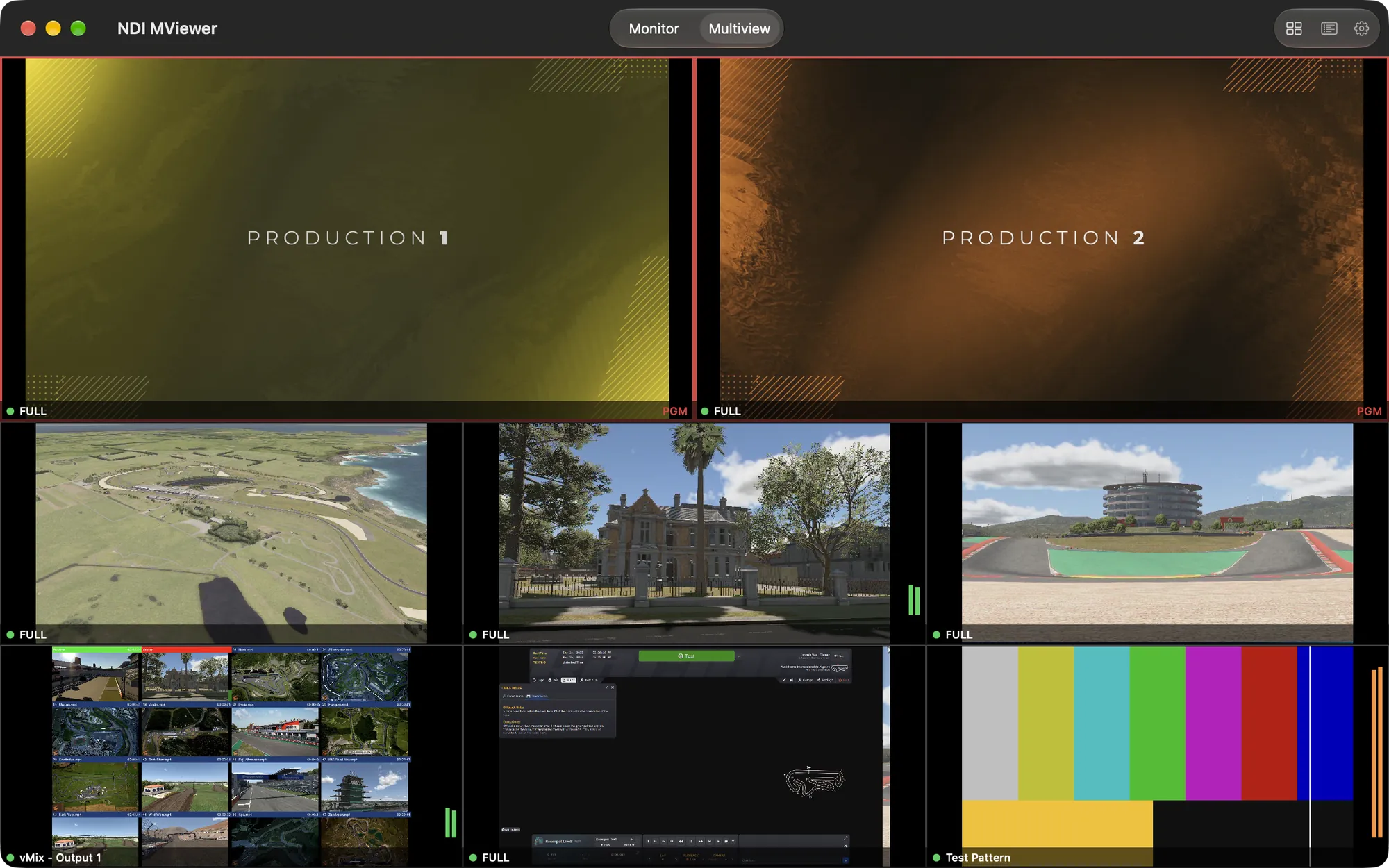
NDI MViewer on the Mac in the 2 + 6 layout: two program tiles with red tally frame and PGM label above six live NDI sources, one of them a test pattern

A control-room view,
wherever you are.

Built for engineers, TDs and camera operators who need eyes on every feed: in the truck, backstage, or on the couch during rehearsal.

  • Multiview grids

    Four layouts, from a quick 2×2 to a wall of sixteen sources.

    • 2 + 6 with two program tiles in a red tally frame
    • Uniform 2×2, 3×3 and 4×4 grids
    • Bandwidth and frame rate set per tile
    • Tap a tile to put it on the full screen
  • Full-screen monitor

    Any source becomes a confidence monitor at full bandwidth.

    • Full bandwidth, full resolution
    • Pinch to zoom up to 8× and pan
    • Live resolution, frame rate and pixel format
    • Controls fade out after three seconds
  • Audio you can see

    Meter every source at a glance, and listen when it matters.

    • Stereo VU meters on every tile
    • dB scale, amber from −6 dB
    • Listen to any source, with a volume slider
    • Meters on or off from the Layout menu
  • Discovery that works

    On the studio LAN or a managed broadcast network.

    • Automatic discovery, nothing to set up
    • NDI Discovery Server support built in
    • Several servers; changes apply at once
    • Sources grouped by machine, searchable

From four sources
to a video wall.

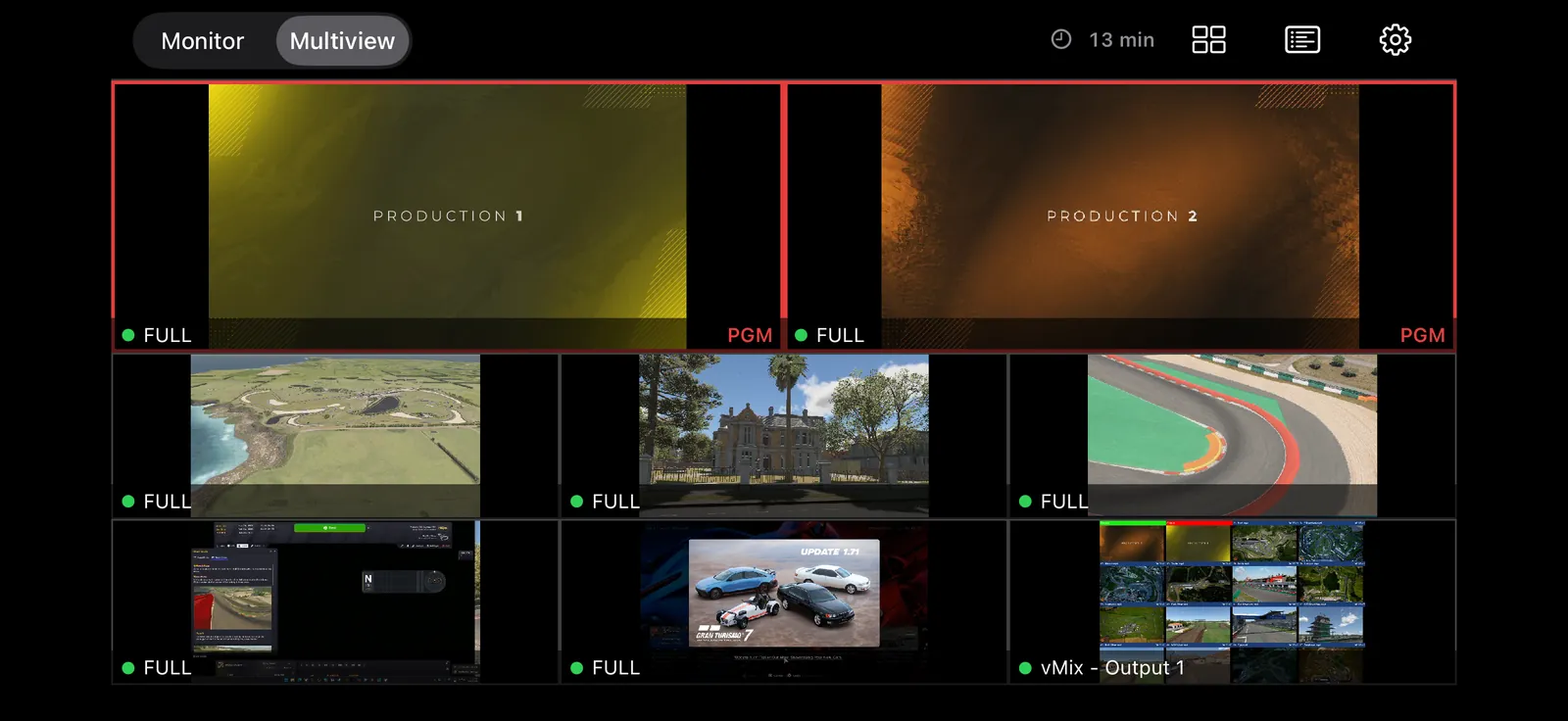
The 2 + 6 layout reads like a production multiviewer: two program tiles in a red tally frame on top, six more below. Or go uniform, up to 4×4 with sixteen sources live on one screen.

  • 2 + 6Two program tiles with tally frame, plus six
  • 2×2 · 3×3 · 4×4Uniform grids, 4 to 16 sources
  • Per tileFull bandwidth or the ~640 px NDI proxy
  • Frame capUnlimited, or 30 down to 1 fps
  • Stream infoOptional resolution · fps · format line
NDI MViewer on iPhone in landscape: the 2 + 6 multiview with two program tiles in a red tally frame and six live NDI sources

When one feed
needs your full attention.

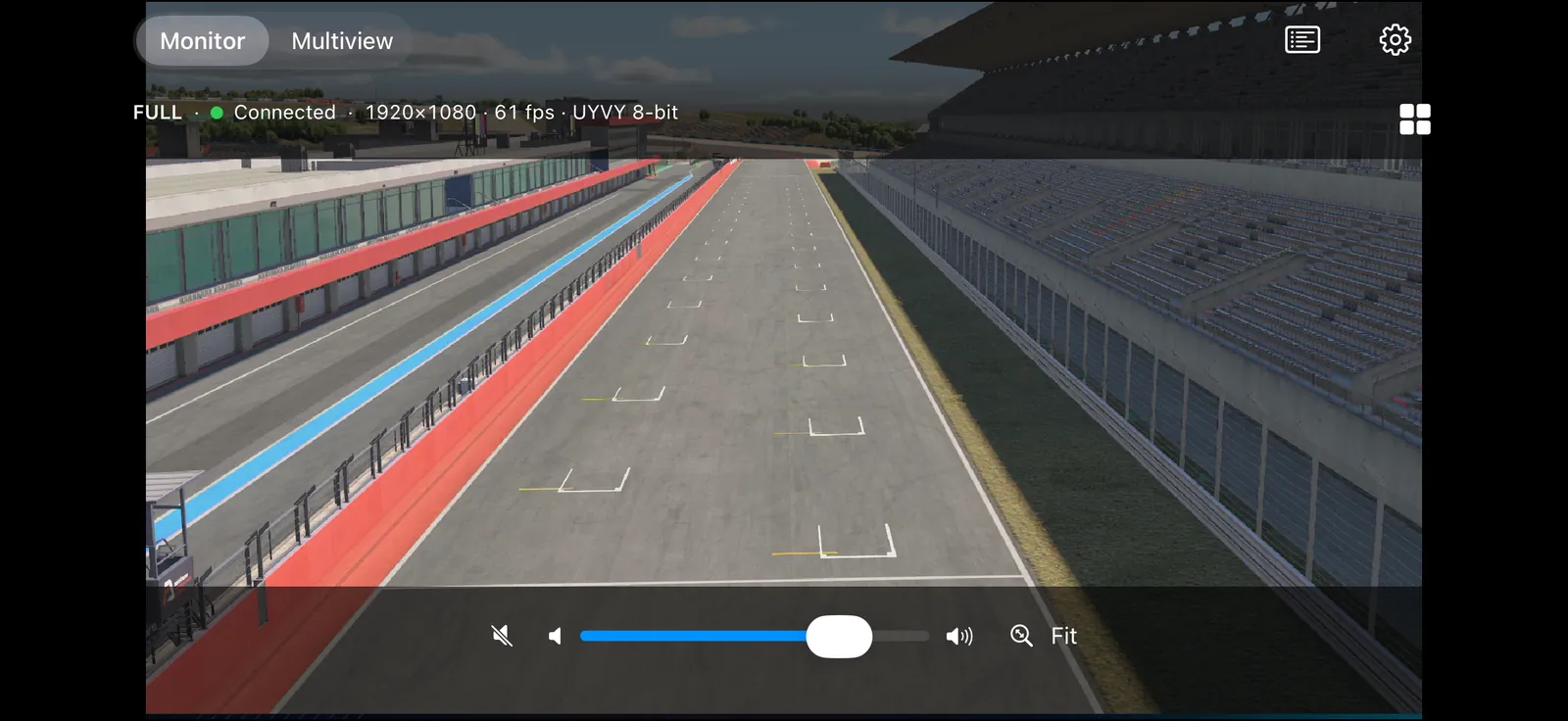
Tap any tile, or open a source straight from the list, and it fills the screen at full bandwidth, with the numbers an engineer actually wants: resolution, measured frame rate and pixel format. Tap the picture again or pinch it closed to get back to the grid.

  • ZoomPinch up to 8×, pan, one-tap Fit
  • Statse.g. 1920×1080 · 60 fps · UYVY
  • AudioListen or mute, volume slider
  • Back to gridTap the picture or pinch it closed
  • Always freeSingle-source monitoring costs nothing
NDI MViewer monitor on iPhone in landscape: a racetrack feed filling the screen, stats line 1920×1080 · 61 fps · UYVY 8-bit, volume slider and Fit button

Native. Metal.
The real NDI SDK.

No web wrapper and no transcoding. NDI MViewer is built on the official NDI® SDK with a GPU pipeline written in Metal, including 16-bit paths for sources that send more than 8 bits.

  • RenderingMetal shaders, colour conversion on the GPU
  • FormatsUYVY, UYVA, P216, PA16, BGRA/RGBA
  • InterlacedFields woven into full frames, e.g. 1080i
  • Demo sourceBuilt-in test pattern, no network needed
  • App languagesEnglish & German
  • RequirementsiOS/iPadOS 16+ · macOS 13+
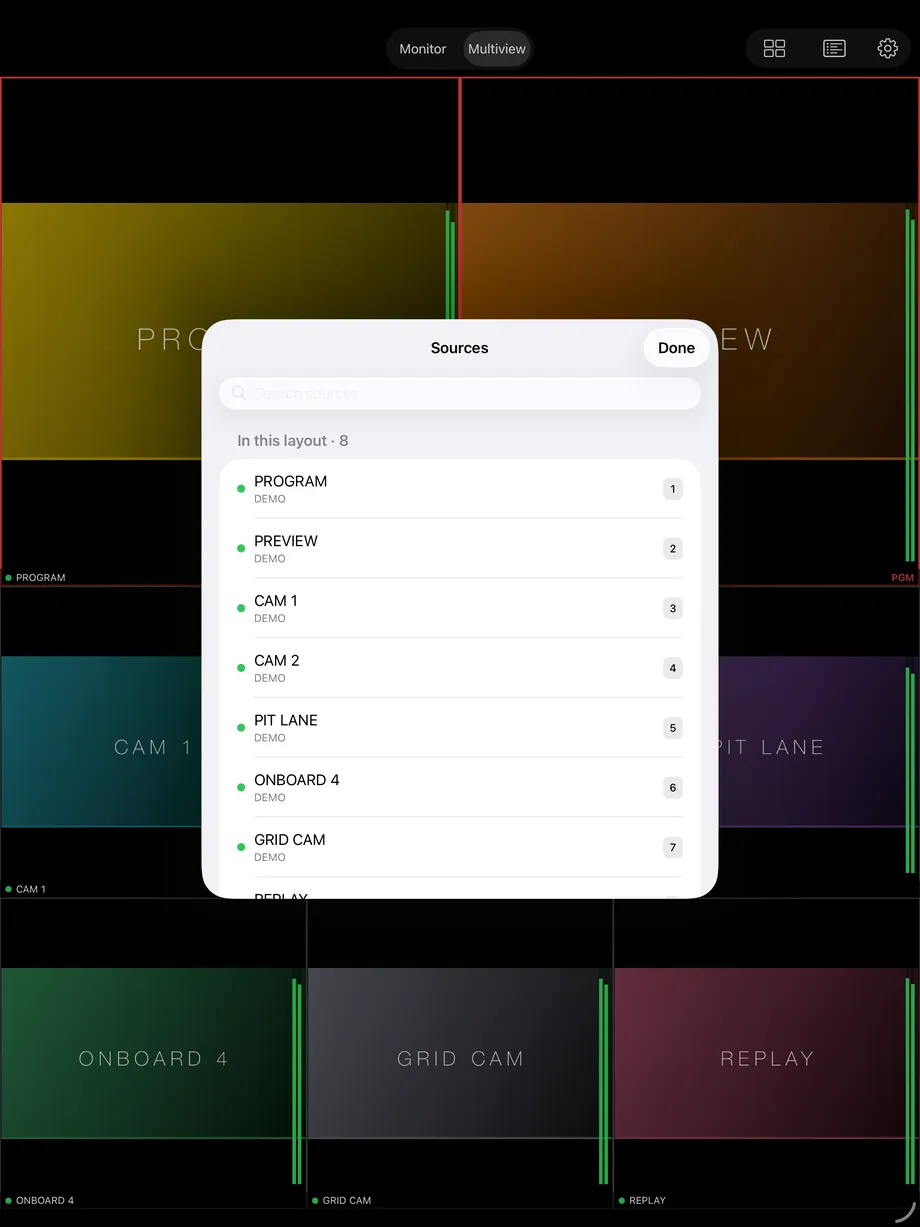
NDI MViewer Sources list on iPad: the eight sources in the current layout with their tile numbers (demo sources)

One subscription.
Every Apple screen.

iPhone

The confidence monitor that’s already in your pocket.

iOS 16 or later

iPad

A proper multiview surface for the truck, FOH or the producer’s desk, in any orientation.

iPadOS 16 or later

Mac

Multiview plus monitor windows: one resizable window per source.

macOS 13 or later · Apple silicon & Intel

Universal Purchase: one Multiview Pro subscription unlocks Pro on iPhone, iPad and Mac with the same Apple ID.

Pricing

Monitoring is free.
The wall is Pro.

Free
0 € forever

Everything you need to check a feed.

  • Unlimited single-source monitoring
  • Full bandwidth, zoom, live stats and audio
  • Automatic discovery and Discovery Servers
  • 30 minutes of multiview to try every layout
Download free
Multiview Pro
9.99 € / month

For productions that live on the multiview.

  • All layouts: 2 + 6, 2×2, 3×3, 4×4
  • Unlimited multiview time
  • Extra monitor windows on the Mac
  • One subscription for iPhone, iPad and Mac
Get Pro

Price shown for the German storefront; the App Store sets the exact price for your region. The subscription renews monthly until you cancel it. Manage or cancel it anytime in your App Store account settings. Single-source monitoring stays free either way.

Built on air,
not on slides.

NDI MViewer is made by Racespot.digital, part of Racespot Media House: broadcast engineers behind 400+ live productions a year for names like Porsche, BMW and iRacing. We built the monitor we wanted on our own shows.

Racespot.digital

Feedback & updates

Fixed, shipped,
and what’s next.

Every update in plain words, newest first. Found a bug we haven’t fixed yet, or missing something? Tell us. We read every message.

Latest update

Version 1.2.0 Build 17

· iPhone · iPad · Mac

Fixed

  • iPad: in Multiview, the Layout, Sources and Settings buttons were cut off, leaving only the timer. They are back in the toolbar.
  • Monitor: swiping the picture at normal zoom could push it off screen and leave a black screen with no way back. The picture now only pans while zoomed in.
  • Mac: the Layout menu no longer changes the toolbar’s height when you switch between Monitor and Multiview.
  • Monitor: at the largest text sizes, the info panel no longer squeezes the volume slider.

Known issues

  • Mac: extra monitor windows are all titled “NDI MViewer”, so several open windows can’t be told apart by their title yet.
Earlier updates (8)
  1. 1.2.0 · Build 16September 8, 2026

    iPhone · iPad · Mac

    Improved

    • Mac: the toolbar buttons now match the size and spacing of the mode switch next to them.

    New

    • Monitor: with the controls showing, tap anywhere on the picture to go back to the multiview grid. While zoomed in, a tap only shows or hides the controls.
  2. 1.2.0 · Build 15September 8, 2026

    iPhone · iPad · Mac

    Improved

    • iPhone in portrait: the toolbar actions are grouped in one “…” menu, so they no longer crowd the mode switch.
    • Mac: the toolbar actions sit on one shared background instead of several overlapping ones.

    New

    • Monitor: a grid button takes you back to Multiview, and pinching the picture closed does the same. Both appear when more than one tile is filled.
  3. 1.2.0 · Build 14September 8, 2026

    iPhone · iPad · Mac

    Fixed

    • An occasional crash when closing the app on iPhone or iPad, or when changing Discovery Servers on the Mac.
  4. 1.2.0 · Build 13September 8, 2026

    iPhone · iPad · Mac

    Fixed

    • Muting a source in the Monitor after listening to it could freeze the app until you force-quit it. Muting is instant again.
  5. 1.2.0 · Build 12September 8, 2026

    iPhone · iPad · Mac

    Fixed

    • Mac: tiles stayed black on Intel Macs with separate AMD graphics.
    • After changing a tile’s source, the previous source’s last picture or stats could briefly appear under the new name.
    • The help for an empty network (check the network, use a Discovery Server) never showed up.
    • Discovery Server changes were sometimes only picked up after restarting the app.
    • Tiles that had joined at low bandwidth could switch to full bandwidth after you returned to the app.
    • Monitor audio could drift further and further behind the picture on some sources.
    • Mac: two monitor windows on the same source now work independently; closing one no longer affects the other.
    • Sources, Settings, Tile Settings and the Pro screen no longer fail to open while another sheet is still closing.

    Improved

    • A calmer interface: one standard Monitor/Multiview switch in the toolbar, and a single row of controls on iPhone in landscape.
    • The free multiview time shows as a small timer that turns amber in the last 5 minutes. It only counts while the grid is actually on screen.
    • Smoother video with less CPU load, especially on large grids. An idle grid no longer redraws.
    • Lower memory use after leaving Multiview.
    • Settings are one simple list on every device. The two tile-contrast switches are gone: tile labels always sit on a solid dark strip.

    New

    • Program tiles in the 2 + 6 layout wear a red tally frame and a PGM label.
    • Stream Info (in the Layout menu) adds resolution, frame rate and pixel format to every tile label.
    • Interlaced sources are shown as full frames and labelled as such, e.g. 1920×1080i.
  6. 1.2.0 · Build 7–11August 27, 2026

    iPhone · iPad · Mac

    Fixed

    • A source already on a tile couldn’t be picked for another tile or for the Monitor.
    • The mode switch could cover the Monitor’s controls and volume slider.

    Improved

    • iPhone in landscape: one row of controls. In the Monitor they hide with the overlay, so the video gets the full height.
    • The Pro, welcome and tour screens scroll on small screens, so their buttons are never cut off.

    New

    • Redesigned with native Apple controls and a visible switch between Monitor and Multiview.
    • Appearance setting: Automatic, Light or Dark. The video area always stays black.
    • One Sources list: what’s in your layout (with its tile number) and what else is available, grouped by machine and searchable. Swipe or right-click to take a source off its tile.
    • A welcome screen explains the local network permission before iOS asks for it, followed by a short tour you can replay in Settings → Getting Started.
    • Tile Settings name the source, machine, resolution and frame rate of the tile you’re changing.
    • New tiles join at low bandwidth so the device keeps up; the first tile stays at full bandwidth. Tiles you already had keep their setting.
    • Discovery Server changes apply immediately, without a separate Apply step.
  7. 1.1.0 · Build 6July 27, 2026

    iPhone · iPad · Mac

    Fixed

    • Mac: tile context menus flickered and closed their submenus.
    • Memory use could grow very large during long sessions, especially in the background.

    New

    • Send Feedback directly from Settings.
    • Per-tile receive settings: Full or Low bandwidth (the ~640 px NDI proxy) and a frame-rate cap from 30 down to 1 fps.
    • Tiles say what’s going on: an empty tile invites you to pick a source, and a source that sends no video shows “No signal”.
  8. 1.0.0July 11, 2026

    iPhone · iPad · Mac

    New

    • First release: multiview in 2 + 6, 2×2, 3×3 and 4×4 layouts, with VU meters on every tile.
    • Full-screen monitor with zoom up to 8×, live stats and audio.
    • Automatic discovery on your network, plus NDI Discovery Server support.
    • Mac: open any source in its own monitor window.
    • Single-source monitoring is free; multiview is free for 30 minutes, then part of Multiview Pro.

Good questions.

What is NDI®?

NDI (Network Device Interface) is the de-facto standard for sending broadcast-quality video over ordinary networks. Cameras, switchers, graphics systems and tools like OBS can all send NDI, and NDI MViewer shows those streams on your Apple devices.

Which sources can it receive?

Standard NDI streams on your network, received with the official NDI® SDK. NDI MViewer decodes 8-bit and 16-bit 4:2:2 (UYVY, P216) and RGBA/BGRA, including the alpha variants, and renders everything on the GPU with Metal. Interlaced sources are shown as full frames and labelled as such, e.g. 1920×1080i.

Do I need an NDI Discovery Server?

No. On a normal LAN, sources appear on their own. On managed broadcast networks that use an NDI Discovery Server, add its address in Settings. You can add several, and changes apply immediately.

Can I try it without any NDI sources?

Yes. The app always lists a built-in Demo source, an animated test pattern generated on the device, so you can try the monitor and every layout before your network is set up.

What’s free and what’s Pro?

Single-source full-screen monitoring is free forever, with full bandwidth, zoom, stats and audio. Multiview comes with 30 minutes of free use in total, so you can try every layout. After that, unlimited multiview needs the Multiview Pro subscription (9.99 €/month on the German storefront).

Does the free multiview time run out while I’m not looking?

No. The 30 minutes only count while the multiview grid is actually on screen: not while Settings or the source list covers it, not while the app is in the background, and on the Mac not while the window is minimised or hidden. A small timer shows what’s left.

Does one subscription cover iPhone, iPad and Mac?

Yes. NDI MViewer is a Universal Purchase: subscribe once with your Apple ID and Pro is unlocked on all your devices across iOS, iPadOS and macOS.

How do I cancel?

Directly with Apple, anytime: App Store → your account → Subscriptions. The subscription renews monthly until you cancel. There is no separate account with us and no lock-in.

Where can I see what changed in an update?

In Updates on this page. Every build lists what was fixed, improved and added, newest first.

NDI MViewer

Put your network
on screen.

iPhone & iPad (iOS 16+) · Mac (macOS 13+) · App in English & German